Takion Technologies Scan Engine

screen · analyse · route · manage

The scan is the first second of the trade, not the whole thing.

Most traders assemble a stack: a screener subscription, a charting subscription, a broker platform, a locate service. Four vendors, four datasets, four logins, and a copy-paste between each one. Takion is a single platform where the scan that found the symbol and the order that trades it read the same book.

See it in motion

Static screenshots prove the columns exist. Watching a scan re-rank as the tape moves is the part that actually sells it.

Platform overview, courtesy of Takion Technologies.

Slot reserved: live scan recording Drop a screen capture at assets/scans-live.mp4 and replace the iframe above — or add it as a second player — with:
<video controls preload="metadata" poster="assets/desk-live.png"><source src="assets/scans-live.mp4" type="video/mp4"></video>

Ten to twenty seconds is enough: one scan window, sorted, re-ranking as prints arrive. 39-OrderFlow re-sorting on %BidNet or 04-RVOL Top on RelVolume shows movement no competitor can imitate, because they do not have the column.

What a session actually looks like

Eight scans from one live layout, mid-morning. Every window is filtering the entire listed universe independently and re-sorting on every print.

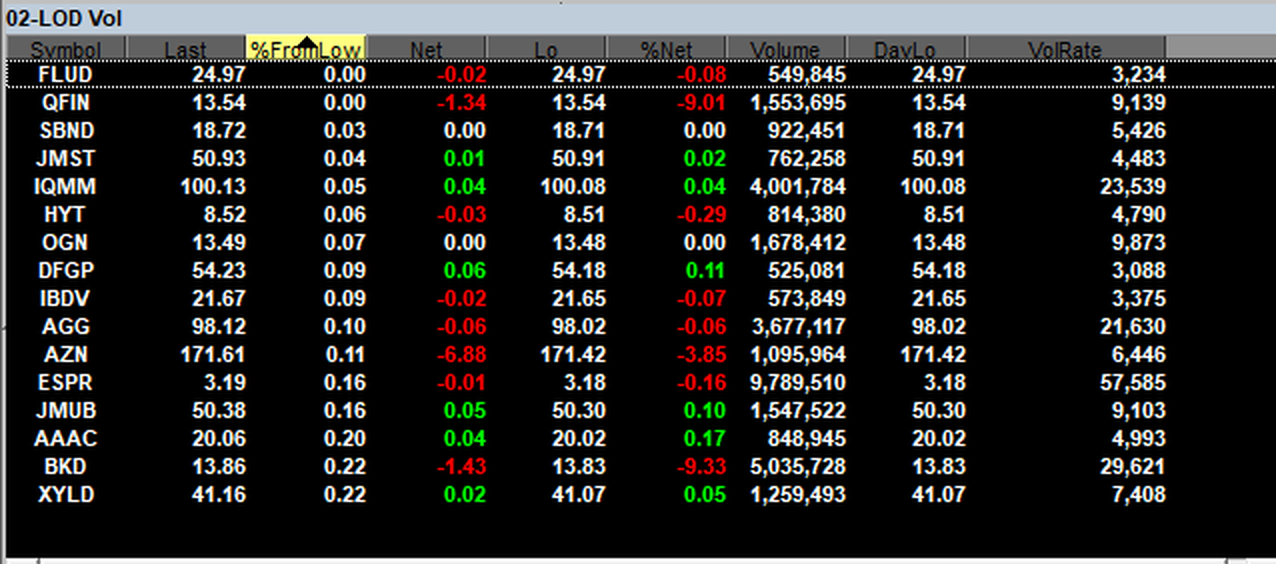
02-LOD Volsorted %FromLow asc
Takion sorter 02-LOD Vol listing symbols nearest their low of day with columns for Last, %FromLow, Net, Lo, %DayLo, Volume, DayLo and VolRate
%FromLow. Distance from the session low, ranked ascending — the names pinned on the lows sit at the top by construction.
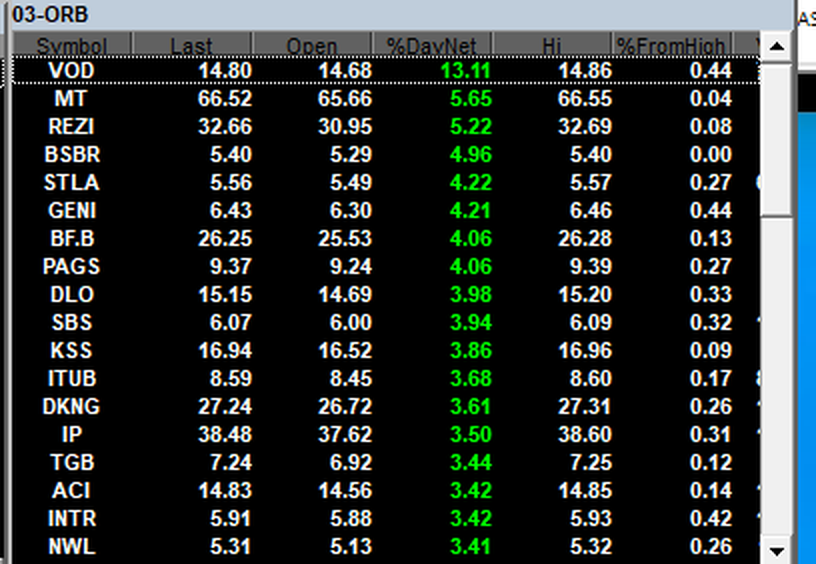
03-ORBsorted %DayNet desc
Takion sorter 03-ORB showing opening range breakout candidates with Last, Open, %DayNet, Hi and %FromHigh columns
%DayNet against Open. Move measured from the opening print rather than yesterday's close, which is what an opening-range scan actually needs.
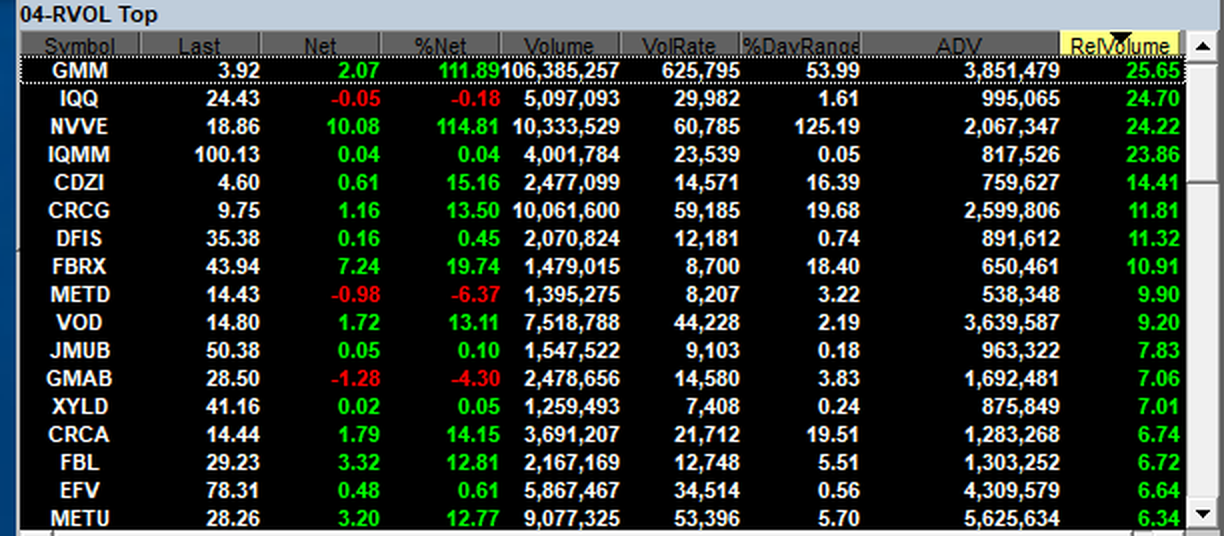
04-RVOL Topsorted RelVolume desc
Takion sorter 04-RVOL Top ranking symbols by relative volume with Volume, VolRate, %DayRange and ADV columns
ADV beside RelVolume. The multiple and the baseline in the same row, so a 25x reading on a thin name is obvious rather than misleading.
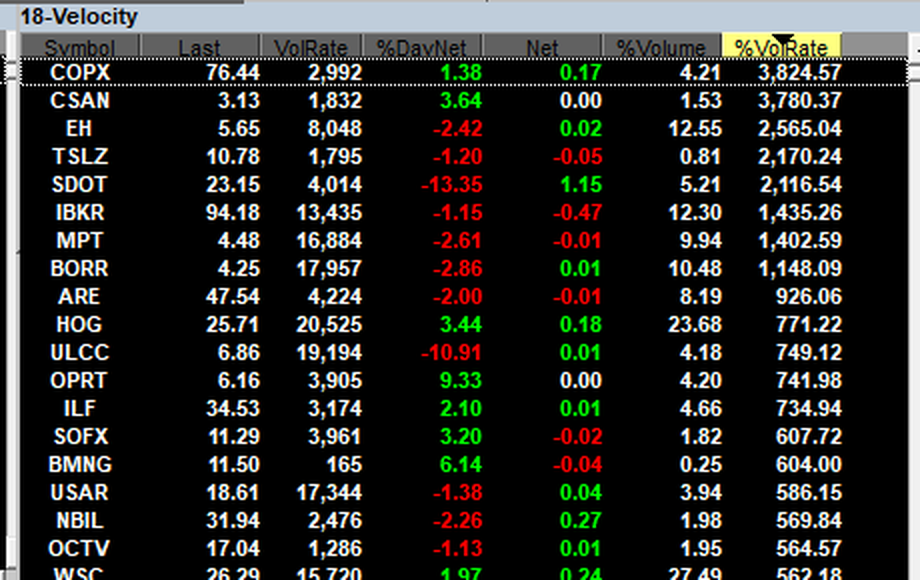
18-Velocitysorted %VolRate desc
Takion sorter 18-Velocity ranking symbols by volume rate with VolRate, %DayVwapDelta, Net and Volume columns on a rolling window
Rolling window. Rate of volume over the last few minutes, not the session total — this is what is moving right now.
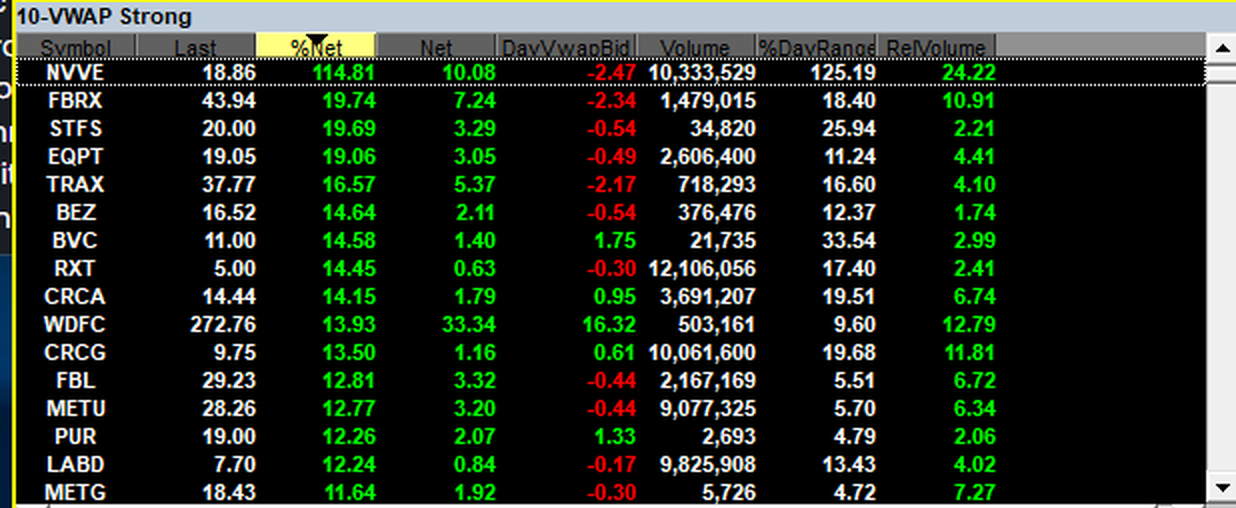
10-VWAP Strongsorted %Net desc
Takion sorter 10-VWAP Strong with Net, DayVwapBid, Volume, %DayRange and RelVolume columns
DayVwapBid. Where the bid sits relative to VWAP, as its own signed field rather than an eyeball estimate off a chart.
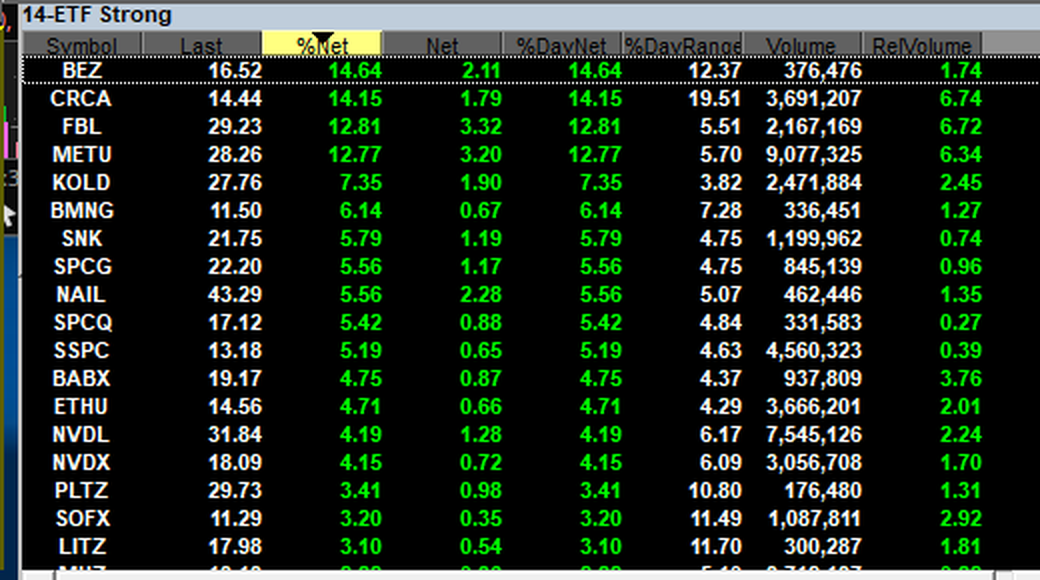
14-ETF Strongsorted %Net desc
Takion sorter 14-ETF Strong ranking exchange traded funds by percent net change with %DayNet, %DayRange, Volume and RelVolume
Sector rotation, live. Rank every ETF by today's move and you are watching money move between sectors in real time.

Advantages that have nothing to do with the feed list

The data is the structural argument. These are the practical ones you notice within an hour of using it.

push, not poll

No refresh interval

Web screeners poll on a timer — five seconds, thirty seconds, a minute. Takion is push-driven off a streaming feed. A row re-ranks when the print happens, not when the next poll fires. There is no such thing as a stale scan.

local compute

Filter changes apply instantly

Cloud screeners send your criteria to their server and queue behind everyone else's. Takion filters locally against a pushed feed, so changing a threshold re-evaluates immediately. You can iterate on a scan during the open instead of waiting on a re-query.

one data plane

You trade what you screened

With a screener from one vendor and a broker from another, the book you screened on and the book you route into are different datasets. Here they are the same feed, so the price in the scan is the price in the montage.

no scan cap

Run as many as your CPU allows

Most subscriptions meter you — a handful of concurrent scans, more for an upgrade. Forty-two windows here is a hardware question, not a billing one.

no black box

Reproducible by construction

No AI scoring model deciding which alerts you deserve. You wrote the conditions, so you can explain every row and reproduce the list tomorrow. That matters when you are reviewing why a scan worked.

idea to order

Zero alt-tabs

Row to montage to hotkey to fill without leaving the window or copying a ticker into another application. The gap between seeing it and being in it is where most of the slippage lives.

Four subscriptions, or one

The comparison people actually make is not screener against screener. It is a stack against a platform.

the assembled stack

  • Screener subscription — consolidated data, polls on a timer
  • Charting subscription — a third dataset, linked by pasting a ticker
  • Broker platform — where the order actually goes
  • Locate service — separate login, separate screen, separate bill
  • News terminal — a fifth window and a fifth tab
five vendors · five datasets · manual handoffs

takion

  • Market Sorter — 42 scans on the raw feeds
  • Charting and Level 2 — same feed, same window group
  • Direct-access routing — smart order routing to your chosen venue
  • Stock Locator — borrow status as a filterable column
  • News, alerts, portfolio, risk — inside the layout
one platform · one data plane · one login

Everything else in the box

The scan library is one window type among many. If you are adding execution to what you already do, this is the rest of what arrives with it.

Direct access routing

Route orders directly to your preferred market makers and ECNs, with algorithmic smart order routing behind it.

Real-time Level 2

Full montage and time and sales, built from the same depth feeds the order-flow scans read.

Advanced charting

Multiple chart types, timeframes and technical indicators, linked to the scans by symbol.

Options chains

Analyse chains with in-the-money highlighting alongside the equity book.

Customisable hotkeys

Configure your own keys and buttons so an order is one keystroke from the scan row.

Trade alerts

Custom alerts on the same field set the scans filter on.

Basket trading

Create, manage and trade custom baskets — useful when a sector scan hands you five names at once.

Portfolio management

Positions and live P&L inside the platform rather than in a broker web page.

News

Market news in the layout, next to the scan that just surfaced the symbol.

API access

Build your own plugins against the platform.

Workspaces and layers

Multiple workspaces and layers, which is how you split 42 scans across pages without one enormous screen.

Risk management

Desk-level controls for firms running multiple traders on the platform.

Stock Locator

Borrow sourcing that feeds the HTB and borrow-cost columns the short scans depend on.

Proximity hosting

Run the client next to the exchanges rather than over a residential circuit.

Full feature list and platform download. Detail on every module, system requirements and the current build live on Takion's own site — the trading platform overview, market data, stock locator and proximity hosting.

The whole loop, one screen

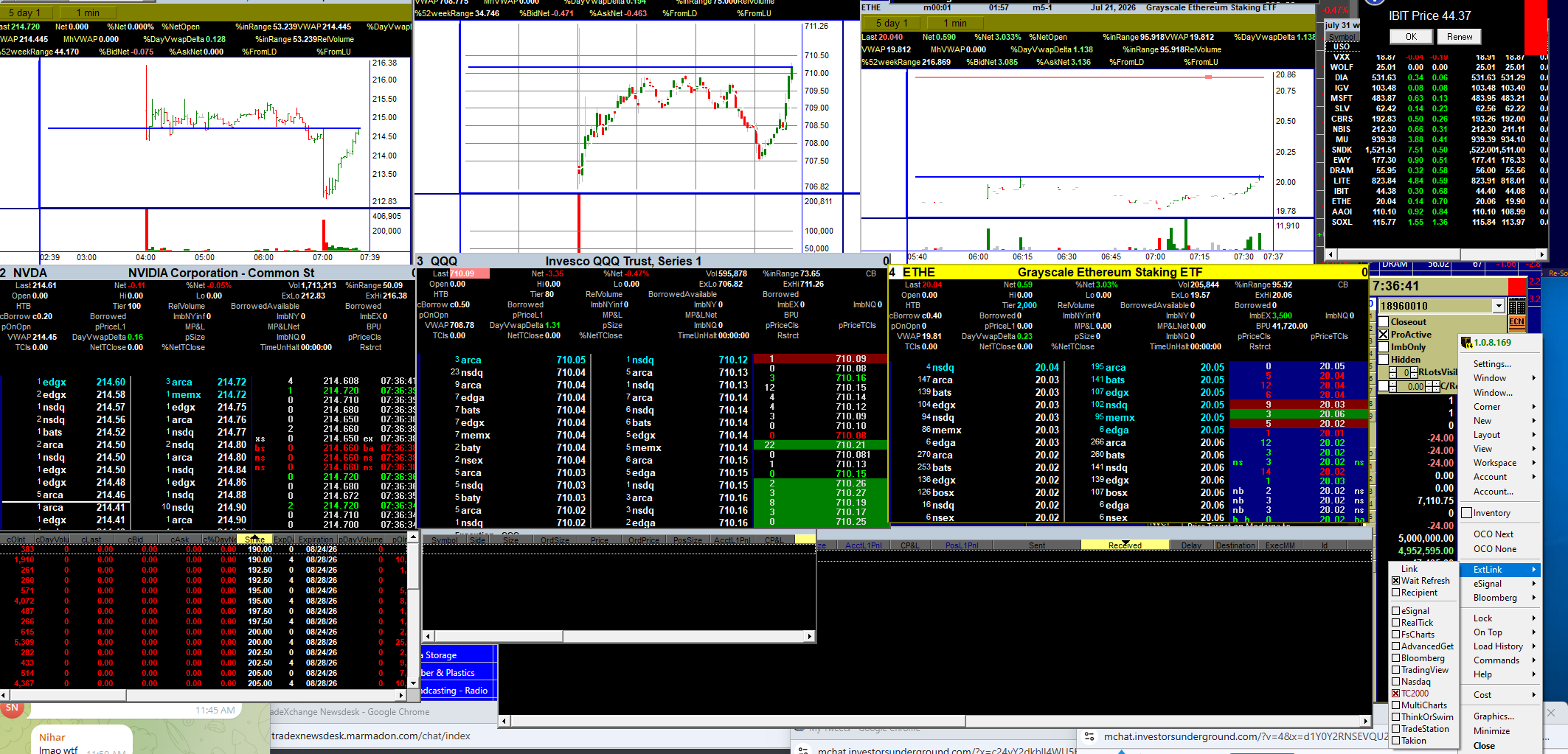
A scan surfaces the name, the montage shows the book, the chart link fires, the order goes out, the blotter records it. Nothing leaves the layout.

Layout · sorters, Level 2, charts, order entry, blotterNVDA · QQQ · ETHE
Full Takion desktop with three charts, three Level 2 montage windows, an execution blotter, a watchlist and the external link menu open
Three montages, three charts, options chain, execution blotter and the link menu — the scan windows sit in the same workspace.

Adding execution to what you already do

If you are running the scans alongside another broker today, moving execution onto the same platform is a conversation with Takion rather than a migration project. Market data entitlements carry over; the routing and risk configuration is what gets added.